Showing posts with label cuda. Show all posts

Saturday, October 1, 2011

Let's talk serious: Dynamic Programming - CUDA pt2

To proceed with my master project i need to learn some more about dynamic programming, because it's a tree structured aproach we can paraele it as we wish. Dynamic programming problems partition a big problem into smaller problems. The fenomenal tutorial on this toppic can be found here:

http://mat.gsia.cmu.edu/classes/dynamic/dynamic.html

also there's many publicly avalible documents on DP approaches to the dense disparity map problems.

one of more interesting:

http://ftp.eafit.edu.co/cadcamcae/documents/09_09_2009_Congote_etal_TV_stereo_depthmap_CUDA.pdf

I will count some disparities with the best window cost for the disparity. I will keep You updated ;) .

As we speak about trees, theres a preatty neet program for finding too large ocupators of Your disc space: WinDirStat ( thank's Peter for sharing :) )
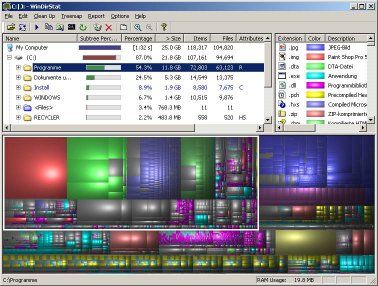

Each rect represents a single file, the color  represents the type of file and the rect size is an equivalent of the space occupied by the file. If You mark a folder it will draw a rect arround the set of rects that occupy that folder. It's great to find out what's killing Your hard drive space. It's a pretty complicated algorithm tho. I will dig deeper into it when i have some spare time.

Download at: http://windirstat.info/

Yes! It's free :)

Monday, August 15, 2011

Let's talk serious - CUDA pt1


I've found myself some time to start working with CUDA for this weekend i've set-up my visual studio for work with CUDA and finally used cuda cores on my GPU. It took so long because i was playing games to look up what's new in the industry (mass effect, crysis, batman arkham asylium, amnesia etc etc ale the stuff with cool and unlimited effects :) ) I must say that the unreal engine is amazing. 
Back to the topic. There's no tutorial given by nvidia for setup. I had to search the nvidia forum to find out how to setup the cuda toolkit 4.0. Here's a 100% accurate help with setting-up visual studio 2010:


Thank You Ade!